Markup
Markups provide visual and informational context on top of referenced 3D data within a 3DSpace. They are used to highlight details, capture feedback, and support communication during review and collaboration workflows.
In instant3Dhub, markups are authored, runtime-generated 2D elements that are persisted with the 3DSpace. They do not modify the underlying 3D data but enrich it with additional context that can be shared with other participants.
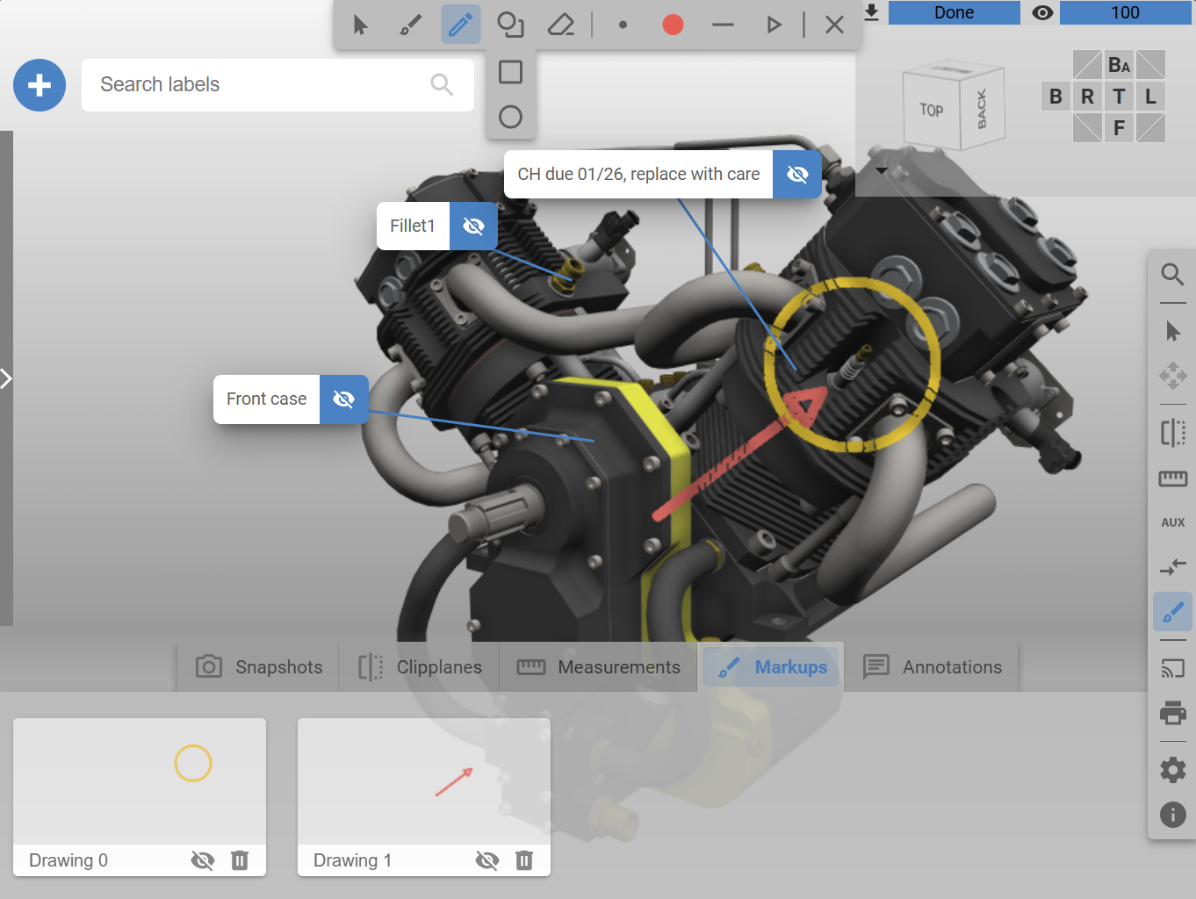
Use markups to annotate and highlight 3D data in a 3DSpace
Types of Markup
Annotation
Annotations provide explanations, references, or links to external systems during collaborative workflows. They support rich content, including HTML, enabling the embedding of images, videos, or links to external tools such as ticketing or issue-tracking systems. Key aspects are:
Contextual information: Provide descriptive or explanatory information related to specific elements in the 3DSpace.
Node-linked: Annotations are linked to a specific node in the InstanceGraph, making their relationship to the underlying data explicit.
Standalone elements: Each annotation exists independently and can be managed individually.
Other properties: Annotations support properties such as position, normal, distance, and transform. See AnnotationProperties for details.
Drawing
Drawings are lightweight, freeform visual markups used to emphasize areas, illustrate ideas, or support quick visual communication within a 3DSpace. They are particularly useful during live reviews or collaborative sessions. Key aspects are:
Drawing modes: Support for freehand drawing or basic shapes such as lines, rectangles, and ellipses.
Editing capabilities: Drawings can be moved, scaled, rotated, or erased after creation.
Styling: Color and line thickness can be adjusted to visually differentiate content.
Drawings can be created using the default webvis user interface or programmatically via the Drawing API.


